
Risks of Spreadsheet-Based Execution
We’ve all used it. And we all know better.
Excel, SharePoint, and SmartSheet just don’t solve the execution gap. If you need the swift kick in the pants to finally do something to make your life easier and your plan more effective – you’ve found the guide that will shock you into action.
If you’ve come this far in looking for a solution to your problems, you don’t need convincing that using spreadsheets to keep track of complicated initiatives is a headache. But do you know the hidden costs and dangers of sticking with the status quo?
If you think it may be “more complicated than it’s worth” to implement, train, and adapt to using new software, do you know what you’re really risking by continuing to use a spreadsheet? (Hint: The error rate alone will make you second-guess everything you’ve ever tracked in Excel.)
Don’t let another month go by where you spend hours pestering people for updates, reading through emails from contributors, and pulling data into an error-prone spreadsheet to export it to a graph to put into a PowerPoint to show the Board of Directors information that, by the time they see it, will already be out of date. Seriously, stop doing this to yourself.
In this guide, you will learn:
- The not-so-obvious dangers of staying with the status quo
- Next steps to take towards flexible and agile organizational planning
- What to look for in a plan execution reporting and management tool
- A comparison of Excel to specialized plan execution software

The Cost of Using Excel for Strategic Plan Management
67% of well-formulated strategic plans fail. There’s a correlation between organizations not achieving their goals and the number of companies using Excel to develop, implement, track, and monitor their strategic plans.
According to the Planning Survey done by BARC Research, Excel is still the most widely used software for planning. However, of the 86% of organizations in the world that use Excel for planning, well over half of those users are not satisfied with the software, and only a quarter of users would recommend it to others.
It’s insane to continue to use a tool you know doesn’t work, but still expect better results next year.
You’re Not Excelling With Excel. The Need for a Better Solution
Spreadsheets are where organizational plans go to die.
Excel and other live spreadsheet programs like SharePoint and Smartsheet are omnipresent in planning, which is stunning because only 17% of Excel users report having no problems in the planning process.
“... only 17% of Excel users report having no problems in the planning process.”
The other 83% are suffering in silence because it’s too expensive and time-consuming to seek a more effective solution, and ironically, they’re paying the price for not switching to something better.
If you were to create a list of the top ten things Excel does best, strategic planning would not make the list. Microsoft built one of the greatest programs of all time, but Excel – largely unchanged since its release in 1985 – was never designed to solve the problems for which Chief Strategy Officers, Enterprise Change Managers, Process Improvement Coordinators and SVPs of Operations are looking for solutions.
There is a better way. The introduction of specialized planning software solutions has changed the game for organizations that have been quick enough to adapt. 53% of businesses using solutions specifically built for planning experienced better quality of results than they had the prior year, whereas only 5% of Excel users improved their results.
If your goals are to improve business outcomes and you’re part of the 95% of organizations still using Excel to monitor unsuccessful execution of your strategic plans, there’s money and time on the table that you must allocate more effectively.
Trying to Fill the Void
About three-quarters of companies today are trying to make up for the inadequacy of using Excel alone and are filling in the deficit with various other tools to reach a solution. However, the ineffectiveness of spreadsheets can’t be mitigated with a patchwork of home-built solutions, operational systems, email back-and-forth, and half-abandoned tools from previous planners or consultants.
The “Patch Technique” only further complicates processes. According to The Planning Survey by BARC Research, organizations that use multiple solutions to monitor plans experience 15% more planning problems on average than if they were using only one tool. Even more alarming, the amount of time needed to provide, process, and consolidate data increases by almost 50% in companies that use more than one software program.
Even with less modern specialized planning programs like IBM Planning Analytics, Excel is often still used on the front end. This can help lessen the intimidation of training and adoption, but doesn’t solve the many pains felt by those who use Excel, SharePoint, or Smartsheet alone.
The best solution? A single software solution that does it all. If we know that, why doesn’t everyone make the switch?
“According to The Planning Survey by BARC Research, organizations that use multiple solutions to monitor plans experience 15% more planning problems on average than if they were using only one tool.”
The Challenges of Finding a Better Solution

While smaller organizations cannot afford more expensive software than the Microsoft Office Suite, larger organizations actually fear that the planning tools on the market cannot fulfill all of the requirements they need to track. Furthermore, with the invention of an app for every task, it’s not uncommon for organizations to suffer from software and change fatigue after going through multiple purchasing and training processes with multiple software solutions.
When organizations make the decision to work with Excel for fear of a low cost-benefit ratio, with either side weighted too heavily, they continue to pay a price for poor execution.
Dangers of the Status Quo
Organizations know that Excel isn’t the best tool for ensuring the tracking strategic plan progress, but professionals continue to choose to deal with these pains anyway.

Bad Data
Spreadsheets, whether live or static, are likely unable to integrate easily with Customer Relationship Management (CRM) and Enterprise Resource Planning (ERP) systems. 33% of Excel users struggle with poor data governance, while organizations that use specialized planning platforms struggle only 8% of the time.
What spreadsheets don’t offer are things like data storage separation and import to a common central database, comprehensive data input capabilities, or the ability to add commentary and context to lines of data.
With little to no integrated support for reporting, analysis, and dashboards (much less financial consolidation, compliance and risk management, or strategy management), exclusive Excel users are suffering on every front while those using specialized planning solutions are able to have up-to-date, easily attainable data at any given time.
With a lack of real-time data, there’s no chance for proactive decision-making. When the di fficulty to consolidate information from different locations eats up valuable time, all the time that’s left is used to be reactive and view actions in retrospect.
With the stress and complication of compiling data, most organizations are driven to only visit their strategic plan quarterly. The amount of time it takes to gather updates manually from dozens or hundreds of people, then entering them into a better format for analysis or presentation, is a deterrent to creating a true governance process. Revisiting your plan only one to four times a year will guarantee your organization will never have access to real-time data.
Lack of real-time data hinders the ability to be proactive in making changes to strategy and execution efforts. The earlier you can pivot based on live information, the larger the impact of the changes you’re able to make. When reviewing numbers at the end of a quarter, rather than a few weeks or halfway through, you lose the benefit of action for that entire quarter.
By eliminating all chances of agile reaction and flexibility, organizations using more than one unspecialized software to track their plans suffer from inadequate data quality because they’re missing one key component to success – a common pool of data.
“33% of Excel users struggle with poor data governance, while organizations that use specialized planning platforms only suffer 8% of the time.”
Moreover, when dealing with version control and edits from multiple people, a level of skepticism is introduced. It’s difficult to focus on strategy and what comes next when there is always lingering anxiety along the lines of, “Is this really the most up-to-date version? When was this last updated?”
The struggle with version control also leads to another point of contention with data in a spreadsheet, which is the lack of context around the numbers and updates you’re consuming. Or worse, if the data is not in a consumable format, the recipient is left wondering, “What am I even looking at?” If the data is in a different format every time a report shows up in someone’s inbox, it further complicates their ability to understand the meaning of the data on the page.
The Risk of Being Prone to Error
That said, not being cloud-based and living in multiple versions on multiple computers leaves your plan vulnerable to losing all your data. General experience points to the fact that the majority of computer users do not regularly back up their files. While more and more organizations are using cloud-based storage systems like Dropbox or SharePoint, many strategic planning Excel files still struggle with version control, as there’s no single designated source of truth.
However, on the other side of the issue, problems with permissions can come into play when everyone can access the document. With live spreadsheet solutions like Smartsheet or Google Sheets, everyone can change everything – including your technically challenged CMO, who might accidentally ruin all of your formulas – or worse, delete an entire quarter’s worth of tracking. Data can be overwritten without leaving an audit trail, and when you don’t have regular snapshots of the system, you lose both your historical record and your ability to investigate past states.
In a MarketWatch study, 9 out of 10 of all Excel spreadsheets have some calculation mistake. With flexibility comes great responsibility, and great potential for error
Limited Access
- Is your Excel spreadsheet saved on one person’s computer? How about multiple versions on multiple desktops? Is that file now too big to keep reloading into your shared document manager?
- If it’s in a shared cloud storage solution, can multiple people access and update it at the same time? Does it automatically save? Track changes? Is past data recoverable in case there’s a mistake?
- Is it easy to export with real-time data? How do you know if the data is updated or past due? When was it last updated, and what is the context of the update? How do you know who missed their deadline?
- Who’s verifying the updates for accuracy of input? Can coworkers comment and provide their own information?
Without team-wide transparency, the one person tasked with keeping the spreadsheet is spending all of their time (and a lot of it) versioning and practicing quality control.
In a recent survey, 26% of Excel users reported that their spreadsheet solution couldn’t handle the number of users who needed to provide updates, compared to the 3% who suffer from the same issue and use specialized planning solutions.
26% of Excel users reported that their spreadsheet solution couldn’t handle the number of users who needed to provide updates.
In order for organizations to be able to effectively execute, the plan must be readily visible and accessible to all contributing members. When opting for a static spreadsheet (instead of a live, dynamic platform), all of these questions should be taken into consideration to make the path more traveled and at least a bit less frustrating.
57% of organizations using specialized planning software saw increased transparency in planning and an overall visibility improvement with reporting capabilities, while only 10% of those using Excel reported an improvement in making their plan more visible and relatable to their employees.
Multiple editor spreadsheet tools like SharePoint and Smartsheet solve some of the problems surrounding access and visibility, but the biggest issue left unaddressed is data flow. Even though these solutions accept changes from many users, they still require someone to look for the data in another program and manually enter it into an ever-growing multi-tab monster.
Essentially, when you’re trying to execute your plan, you need to hold people accountable for two things: 1) executing the items they’re responsible for, and 2) making regular and timely updates. If you’re missing either of these elements, your plan will be in danger of failing. Excel’s inability to provide an easily filtered big-picture view and quick and simple updates fails in both scenarios.

The "Excel Guru"
You’ve overcomplicated your Excel tracking template to a point where now only one person knows all the formulas and what to add where. We all know that single team member with an honorary degree in using VLOOKUP who gets asked to do it every time.
In the case that the Excel Guru, who alone knows how to decipher the information, leaves the company, do you have a clear way to onboard and train multiple people? Have you documented the color coding, conditional formatting, dependencies, and naming conventions so that the document can be picked up and used by someone else?
What does knowledge transfer look like for project owner reassignment? Is the history of the tracked success of that project easily accessible?
It’s a laborious task to document all of this information, as it is subject to becoming outdated quickly, but if you’re going to use the “Keeper of the Keys” solution to keep your data tidy, the responsibility of the organization is to keep all of this documentation on hand.
The other side of this problem is lack of uniformity in planning. If you don’t have an Excel Guru to keep everyone’s data in line, you likely have fifteen different departments who all use Excel, but when updates come in, you likely suffer from fifteen slightly differently formatted versions of the same document. It’s almost as if everyone is speaking the same language in different dialects – and it falls on someone to translate. In this situation, it’s impossible to run a report that gives you the status of how the organization is doing as a whole, because you’re forced into departmental silos.
Lack of High-level Overviews and Not Enough Plan Detail at the Same Time
Global organizations that use Excel to track and monitor their plans can have hundreds of sheets in one complicated spreadsheet that still doesn’t track everything they need. And yet, the spreadsheet also doesn’t provide a good executive dashboard view of everything at a high level.
It’s an odd limbo to be caught within – not detailed enough and too detailed at the same time. When in this state of not-enough-but-also-too-much, important information can get lost in all the clutter because the data is difficult to analyze, aggravated by the fact that it’s done as an afterthought after several hours are spent just pulling a report together.
Organizations using specialized planning tools reported that 51% of users were able to improve the precision and detail of their structured plans, while only 8% of Excel users were able to build more detailed plans than before.
It’s nearly impossible to easily understand something like, “How are we doing in the area of safety across
the organization?” when many activities live under many major strategic priorities and they’re scattered across twenty different workbooks and tabs. The inability to filter by status and area across multiple plans hinders companies looking for the overall view without spending weeks in meetings.
Organizations using specialized planning tools reported that 51% of users were able to improve the precision and detail of their structured plans, while only 8% of Excel
Just as important as the level of detail itself, how are you able to view and present the data? How many additional views do you need to create in your spreadsheet to suit the day-to-day requests for information from different departments with different interests? Summarizing roadblocks and showing team progress and initiative updates can be cumbersome when you need to create and export specific filters and tabs for every request – and remember which one is which.
Time
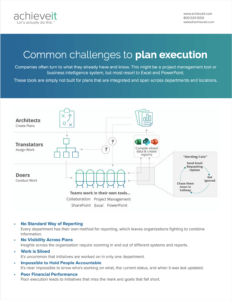
Manual reporting wastes time. It’s more than just data entry. It’s chasing updates, compiling information from email into Excel into graphs into PowerPoint into a PDF, accuracy verification, formula creation and template maintenance (fixing what others may have inadvertently changed).
Out of those who exclusively use Excel for planning, the dissatisfaction with quality of results and the amount of work (time) it takes to provide data is felt by 93% of users.
However, the real problem isn’t the cost in hours and dollars. Your organization’s loss of time is measured in the inability to get to market faster and losses to competitors. Your dulled reaction time and general business is keeping your organization from starting development on something new, stopping an expensive project that’s not paying off or double down on what’s working.

The real threat is the opportunity cost of the time it takes for someone to chase down updates, manually input data, compile information for consumption, etc.
Your planning manager could be working on projects that generate significant growth for your company, or they could dedicate the majority of their time reminding stragglers to email updates to an overflowing inbox and formatting a spreadsheet.
It’s the cost of what “could be.” It’s the gap between your strategy manager’s (and organization’s) potential and the reality of how much time these pains consume.
This loss is amplified by the fact that the people charged with managing execution, and the executors themselves, waste phenomenal amounts of time trying to document, track and report their own progress, manually pull data from several programs, format it, send it to the right place and remember when updates are due in the midst of their other project timelines. It seems clear that most leaders would rather make it possible for all of those employees to do the jobs for which they were hired.
This price doesn’t go away when using specialized planning software, but it is cut down significantly by just enabling multiple users to input data into one common location without compromising the integrity of the data and tracking. With things like real-time data integration, the company's spend on human resources to do manual reporting in Excel is chopped down even further.
Outside of what it costs your organization to not be executing your plan to reach your goals, companies are likely spending thousands of dollars just to keep the cogs turning on a machine that doesn’t work. Organizations are often relegating top talent to low-value work by paying someone hired to ensure a bright future for a company to look at Excel all day.
The Way of the Future: Integrated Planning
Adapting to today’s evolving state of organizational planning.
Solving for Plan Rigidity
Organizational planning is in a state of evolution. We’re not putting together strategic plans the same way we did in the 90s. Strategic plans today are all types of plans – mergers & acquisitions, product roll-outs, risk management and compliance, operational excellence, etc. – that require strategy. With the scope of “planning that is strategic” in flux, the way we’re tracking and adapting has to bend with us and become more flexible and agile.
Chasing updates and copying and pasting numbers into a spreadsheet isn’t going to cut it anymore.
Integrated planning is the way of the future, as we align individuals to strategic initiatives to show their direct impact on organizational goals. As we make way for more detailed planning, better integration with other performance management processes, shorter planning cycles, and a stronger focus on key factors and value drivers, the need to save time on the front end of data collection to be able to spend more time on analysis is increasing.
Right now, it takes so long to coordinate resource-intensive planning efforts that the plan is often outdated by the time it has been signed off on and implemented using multiple planning tools.
Some of the issues we’ve seen with inflexible, unspecialized software are:

PROLONGED PROCESS LENGTH

INSUFFICIENT PLAN DETAIL

DIFFICULTY OF DATA UPDATES

UNSUPPORTED PLAN IMPLEMENTATION

ABYSMAL EMPLOYEE ENGAGEMENT
UNRELIABLE DATA & POOR RESULTS
If the only reason you’re continuing to use Excel is that your employees already know how to use it, it’s time to stop paying the price of being inadequate and commit to a culture of execution with specialized planning software.
APPENDIX
Strategic Planning Software Evaluation Checklist
We’ve put together a checklist and chart to help when evaluating strategic planning software to cure your Excel pains once and for all.
- Is data stored in a location that can be accessed anytime, anywhere, by anyone?
- Does the solution provide a simplified user experience?
- Does the platform/software provide one version of the truth?
- Is the data provided in context? Is commentary easily visible?
- Can you easily filter initiatives by status? By owner? Due date?
- Can you visibly align initiatives to overarching strategies?
- Is it easy to view who’s on and off track and what data is missing?
- Can you reorganize the data into different views?
- Can information from multiple plans be viewed at once?
- Can you access real-time updates? Is live data integration available?
- Is it possible for multiple users to access the platform and make changes at the same time? Does the software make composite changes automatically?
- Are there options for permissions-based editing?
- Can reports be automatically scheduled and sent?
- Is information compiled into a customized, live dashboard?
- Does the platform make it easy to remind users to provide their updates?
- Does the software include a support system behind it to ensure a successful implementation and overall ROI?
How AchieveIt Compares to Excel
If the only reason you’re continuing to use Excel is because your employees already know how to use it, it’s time to stop paying the price of being inadequate and commit to a culture of execution with specialized planning software.
EXCEL | ACHIEVEIT |
|---|---|
Filterable data | Filterable data |
Manually-built organizational goal roll-up view | Organizational goal roll-up view |
Static | Dynamic |
Spreadsheet | Aligned view |
Document version control | Cloud-based, real-time data |
Manual reporting export | Automatic reporting export with scheduled deliveries to specifi c people |
Complicated formulas and conditional formatting | Automatic formulas and conditional formatting |
Editable by one person at a time | Editable by multiple people at a time |
Manually sort by priority and status to know how/what to attack | MeetingManager: Sort by priority and status to know how/ what to attack |
One tab at a time | MultiPlan View: Track overall success across numerous plans |
Hours spent chasing updates and compiling information | SmartAlerts: Automatic email reminders sent automatically to project owners |
Time wasted in status update meetings getting qualitative reasoning for data | CriticalContext: An audit trail of every past update, and the story around each update |
Exporting data and reorganizing for executive consumption (probably using PowerPoint) | InsightDashboards: High-level summaries at your fi ngertips |
Accessible for employees in a shared fi le location | True, real-time organizational visibility |
Meeting overload to stay up to date and collaborative for every initiative | Save time in status update meetings to talk about what comes next, not just give data updates |
Either everyone can view and make updates, or one person can | User permissions allow for various levels of access and viewing |
The Microsoft fi le linking functionality leaves you susceptible to losing the linked fi les due to renaming and fi le location | Upload fi les to the cloud-based system once |
Strategic planning Excel templates online | Your Customer Success Team with provide training and best practices, and you have access to 24/7 Technical Support |
No roll-out or training necessary, since everyone uses Excel – but implementation, adoption and reinforcement are di cult | Workshops run by AchieveIt Professional Services work to level up the strategy and execution knowledge of the entire organization, creating a culture of execution |